
Using this menu item you can edit the coordinates of all data points. For example, if you used an incorrect scale during input, it can be corrected here by applying an appropriate factor. You can apply the factor to one direction only if necessary, i.e. to the x or to the y coordinate.
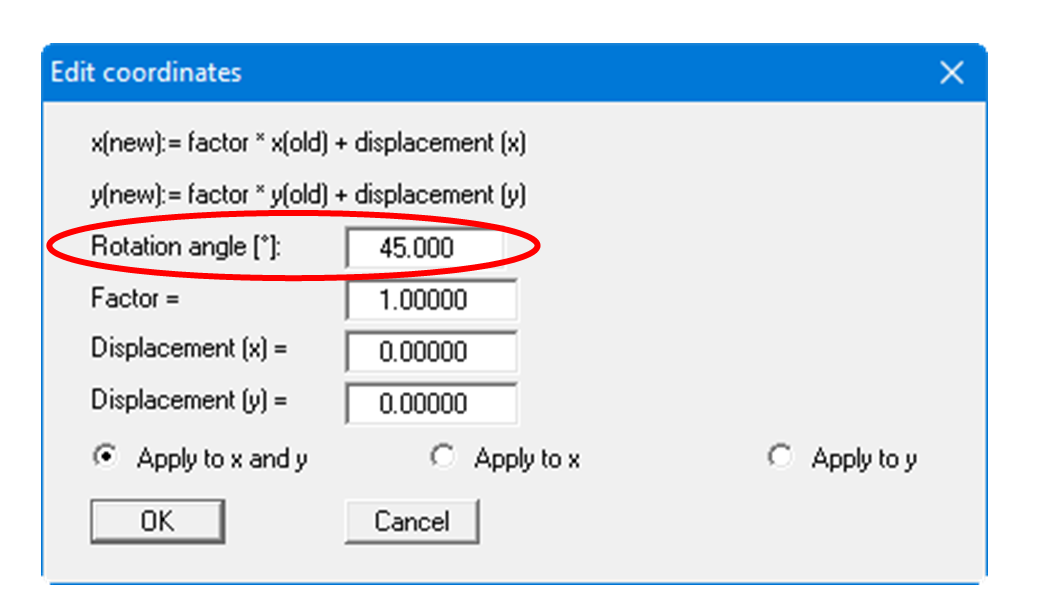
An additional option is to enter an angle of rotation if you need to realign your point's orientation.
However, you can also simply displace the coordinates in x- or y- direction to reach the correct location, or to fit to eastings and northings (see previous menu item "Edit/Test point coordinates").
Optimize coordinates
The "Optimize coordinates" button automatically calculates a suitable offset to convert large coordinate values into smaller working coordinates.
Use case: Large UTM coordinates (e.g., X ~ 32,500,000, Y ~ 5,800,000) can cause performance problems and calculation inaccuracies. The optimization shifts all points towards the coordinate origin.
How it works:
-
Click on "Optimize coordinates"
-
The program automatically calculates:
-
Minimum of X coordinates across all points
-
Minimum of Y coordinates across all points
-
Rounds down to nearest 1000
-
-
The calculated offset values are entered in the dialog
-
Review the values and click "OK" to apply
Example:
-
Before optimization: X = 32,500,500, Y = 5,800,200
-
Calculated offset: X = -32,500,000, Y = -5,800,000
-
After optimization: X = 500, Y = 200
Tip: For projects with UTM coordinates, use this function immediately after loading data to achieve optimal performance.
Note: The offset is applied uniformly to all points. Relative distances between points are preserved.