
In the default program preferences, the form is shown with cutting borders. For output to an A4 printer, a reduction of the printer output is generally necessary, as proprietary printers cannot fully cover an A4 page. The margin preferences can be defined in the following dialog box.
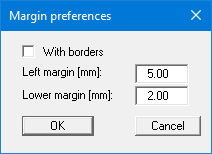
By deactivating the "With borders" check box and with an appropriate choice of left and lower margins, it is generally possible to create a non-reduced printer output. It is necessary to also adapt the page height and width .
If you also deactivate the "With margins" check box, the thicker border around all the graphic elements on the output sheet will be removed. You can create a completely new arrangement on the form by moving the individual graphic elements.