GGU-FOOTING: "Footing details" menu item
Depending on the analysis mode and the safety factor concept selected, you will see a modified dialog box for input of footing sizes and/or stresses (see Worked examples, Sections “Define footings (Example 1)”, etc.).
The following dialog box opens in the "Rectangular footing" analysis mode using partial safety factors:
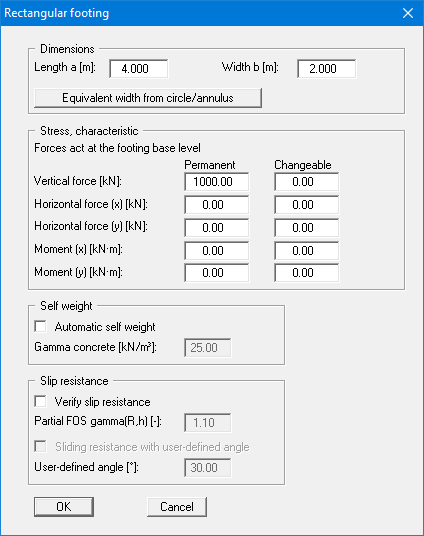
Enter the dimensions and stresses for the footing. According to the partial safety factor concept, you can define differing stresses for permanent and changeable loads (live loads). Instead of the footing analysis diagram seen in the "Multiple footings" analysis mode a plan view of a pad footing (rectangle or circle/annulus) is shown with the loading values, among other things.
The friction angle of the soil at the footing base is adopted when analysing the sliding resistance of a pad footing (rectangle or circle/annulus). Any user-defined angle can be adopted by activating the "Sliding resistance with user-defined angle" check box. This can be useful if soils with a low friction angle are prevalent below the base of the footing, for example.
If the column is not centred on the footing, enter its offset from the footing centre under "Ecc. vertical force" (ex, ey) (from version 11.0). The program derives the additional moments My = V · ex and Mx = -V · ey. They are coupled to the entered vertical force V and are added to the separately entered moments. Using partial safety factors, this applies separately to the permanent and the variable part of V. The "?" button next to the input shows the formulas.
The automatically determined self-weight of the footing always acts centrically; only V is offset (from version 11.4; earlier versions offset the self-weight as well). If the self-weight is not determined automatically and is included in the entered vertical force, for example when adopting values from the base pressure verification of a structural analysis, the eccentricity acts on this total vertical force.
GGU-FOOTING can also analyse the torsional stiffnesses of footings. Circular or annular footings are often used for the foundations of wind energy converters. In this program version a circular/annular footing can be selected by going to the menu item "Edit/Analysis options". In this menu item you are then presented with a correspondingly modified dialog box for defining the footing (see "Define footing (Example 3)").
In older program versions it was possible to convert the circular or annular footing data to a square footing (see dialog box above) to determine the torsional stiffnesses for a rectangular footing by pressing the "Equivalent width from circle/annulus" button in the above dialog box.