GGU-RETAIN: "Excavation" menu item
A dialog box opens for defining the excavation and the selected retaining wall.
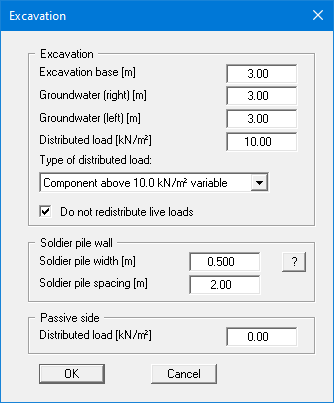
In the upper group box, enter the depth of the excavation base and the groundwater levels. If you checked the "Use absolute heights" box when defining the system, an additional entry, "Top of wall", appears in the dialog box for specifying the absolute position. In this case, all heights are measured in m AD or m site zero, i.e. the y-axis is positive upwards. You can then enter a value, for example, of 86.42 [m AD] in the "Top of wall" field. All further input must then be with reference to this value.
If the height of a previously defined system is subsequently set to absolute heights, a query follows after leaving the dialog box above asking for confirmation of whether soil strata and defined elements such as anchors, for example, should be adapted to the new wall top. Adaptation would mean that the depth of a soil layer entered as a positive value would be converted from, for example, 7.5 m to an absolute height of -7.5 m AD. If, then, you only convert your system to [m AD], do not select any elements in the query box and press the "OK" button.
Moreover, a distributed load can be defined. If you are working with the partial safety factors, decide whether the distributed load is "Permanent", "Changeable" or the "Component above 10.0 kN/m² changeable" (see the following dialog box). "Component above 10.0 kN/m² changeable" means, for example, that for an input of 13.5 kN/m², 10 kN/m² are adopted as permanent and 3.5 kN/m² as changeable in the analysis (see EAB, R 7).
In the group box below this in the dialog box you make the required entries for the retaining wall. This section of the box varies depending on the type of wall:
- Soldier pile wall: "Soldier pile width" and "Soldier pile spacing".
- Bored soldier pile wall: "Pile diameter" and "Pile spacing".
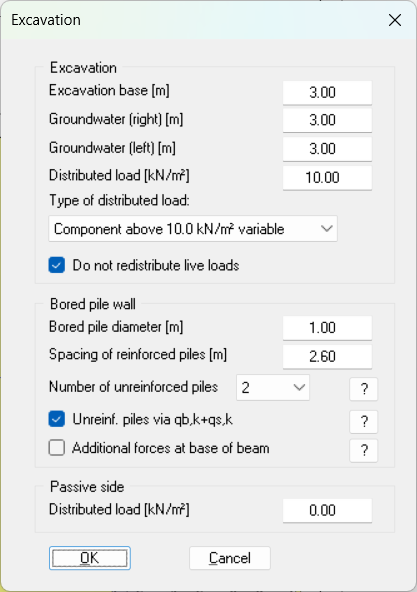
- Bored pile wall: "Bored pile diameter", "Spacing of reinforced piles", "Number of unreinforced piles" and further check boxes (see below).
- Diaphragm wall: "Diaphragm wall thickness".
- FMI/MIP wall: "MIP wall thickness" and "Girder spacing".
- Sheet pile wall and combined sheet pile wall: no further entries in this dialog box.
For all wall types, you can additionally define a distributed load on the passive side under "Passive side".
Bored pile wall
For a bored pile wall, the dialog box may look like this:
The above entries lead to the following bored pile wall:
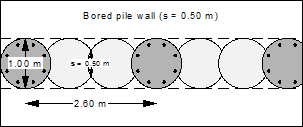
Under "Spacing of reinforced piles" (called "Bored pile spacing" in program versions before 13.17), enter the spacing of the reinforced piles. For a secant pile wall with alternating unreinforced primary piles and reinforced secondary piles, enter twice the spacing of adjacent piles and select 1 under "Number of unreinforced piles" (not "auto"). The unreinforced piles are then verified using a compression vault.
Only the reinforced piles are considered in the reinforced concrete design. The reinforcement As given therefore applies to each reinforced pile.
The "?" buttons in the dialog box explain the further check boxes.