GGU-RETAIN: "Design defaults" menu item
Once the current system has been analysed you can progress directly to the retaining wall design (see menu item "System/Analyse"). In addition, using this menu item, you can also carry out subsequent design for a different section to that used for the analysis.
The program reacts differently depending on the type of retaining wall (soldier pile wall, sheet pile wall or in-situ concrete wall). For soldier pile walls, for example, you will see the following dialog box:

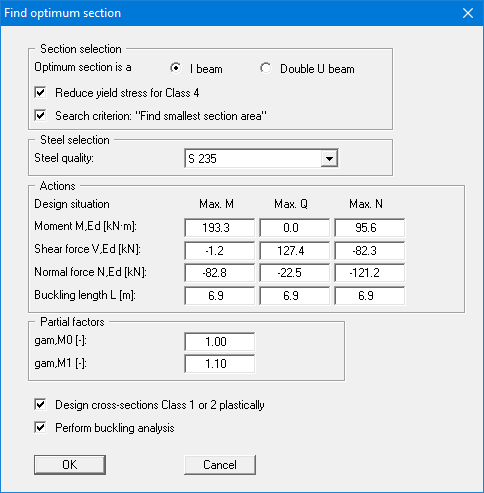
If you would prefer to have the program search for the optimum section, select the upper radio button and the following dialog box opens:
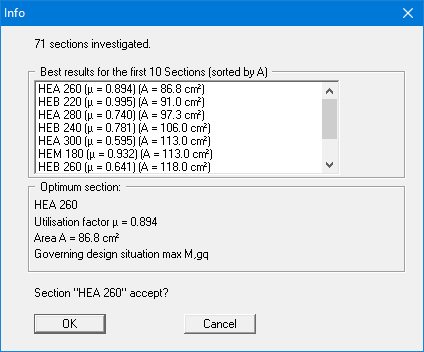
The search result is displayed in another dialog box. If you want to adopt the optimum section proposed by the program, click "OK".
Following this the analysis results are displayed in a message box. If you selected the proposed optimum soldier pile, you should adapt the soldier pile width to suit the section in your system by pressing the "Use" button. Subsequent reanalysis is recommended. The infill walling for soldier pile walls can then be designed.
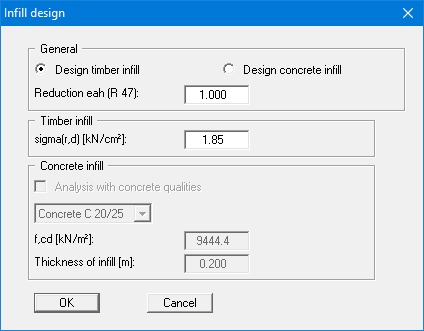
The program then searches for the maximum active earth pressure ordinate, max eah, determines the maximum moment for the infill from
(max eah) · (soldier pile centres)2 / 8
and calculates the required thickness of the infill elements using the allowable stress. Alternatively, to timber infill, concrete infill can also be designed.
Unreinforced concrete or shotcrete infill (soldier pile wall, open wall, inserted soldier piles) and the unreinforced piles of a bored pile wall are verified by the program using a compression arch within the infill (Weißenbach). The arch rise is taken as f = 0.5 · infill thickness (for bored pile walls 0.5 · overcut height). The compressive stress in the arch is
σd = 0.5 · eh,d · (a/d)²
where a = centre-to-centre distance of the soldier piles or piles and d = infill thickness or overcut height. To make the derivation traceable, from version 13.18 the results message box, the printout and the legend additionally show the centre-to-centre distance a, the assumed arch rise f and the formula after the line "Thickn. comp. vault".
When design is complete you are informed of the verification results in an information box and are presented with the principal data on which the design was based. After confirming with "OK", the state variables and the system are presented on the screen.
Factor kf for bored pile walls and bored soldier pile walls (from version 13.16)
According to EN 1992-1-1, 2.4.2.5 (2), the partial factor γc for cast-in-place bored piles without permanent casing may have to be multiplied by a factor kf. Enter this factor in the design dialog box under "Partial safety factors for materials" in the field "kf" directly below "γ (Concrete)". The default is kf = 1.0; smaller values are not permitted. This corresponds to the German rule according to DIN EN 1992-1-1/NA (see also EAB, Table 7.3) for bored piles constructed in accordance with EN 1536; otherwise kf = 1.1 applies there. The field is not available for diaphragm walls because the standard provides the factor only for cast-in-place bored piles; the design there uses γc alone.
The program calculates with γc · kf: the design compressive strength of concrete is fcd = αcc · fck / (γc · kf), and CRd,c and vmin for the shear resistance without shear reinforcement are also determined with γc · kf. If kf ≠ 1.0, the value is stated in the confirmation prompt before design and in the legend.
In earlier program versions without this field, kf > 1.0 could be taken into account by entering the value γc · kf for "γ (Concrete)", e.g. 1.65 for γc = 1.50 and kf = 1.1. Both approaches give the same results.