
From the "Editor 1" menu select "Berms (active side)". Click "0 berm(s) to edit" and enter 1 as the new number of berms.
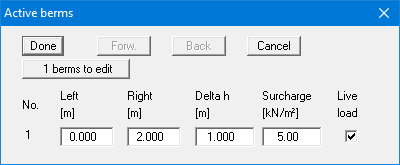
Enter the values from the above dialog box and confirm by clicking "Done".
From the "Editor 1" menu select "Berms (active side)". Click "0 berm(s) to edit" and enter 1 as the new number of berms.
Enter the values from the above dialog box and confirm by clicking "Done".